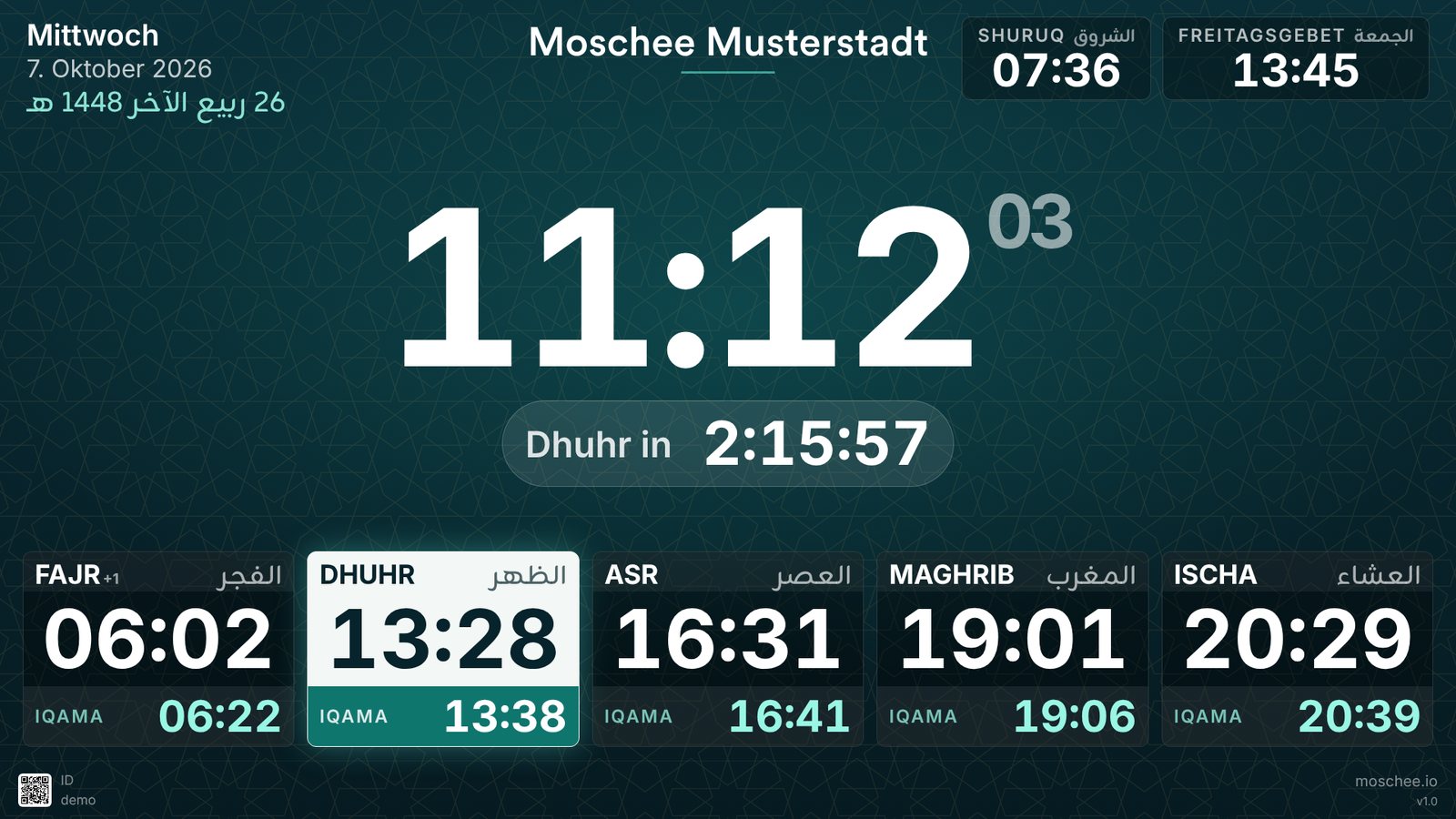
A screen in the prayer hall is read differently from a phone. People see it from ten meters away, walking past with their shoes still in hand, and usually for no more than a second. In that second it has to be clear when the next prayer is and how long until the iqama.
So for version 1.7.0 we redesigned every view of the mosque screens: the prayer times, the adhan, the iqama, the adhkar, the hadiths, the announcements and even the page that appears when you pair a new TV. The update applies to every mosque, including the free plan, and your screens fetch it by themselves.
Five designs to choose from
Until now, every mosque screen looked the same. Now you pick one of five designs under Screens → Settings, each in landscape and portrait. These are real captures of the screen app:
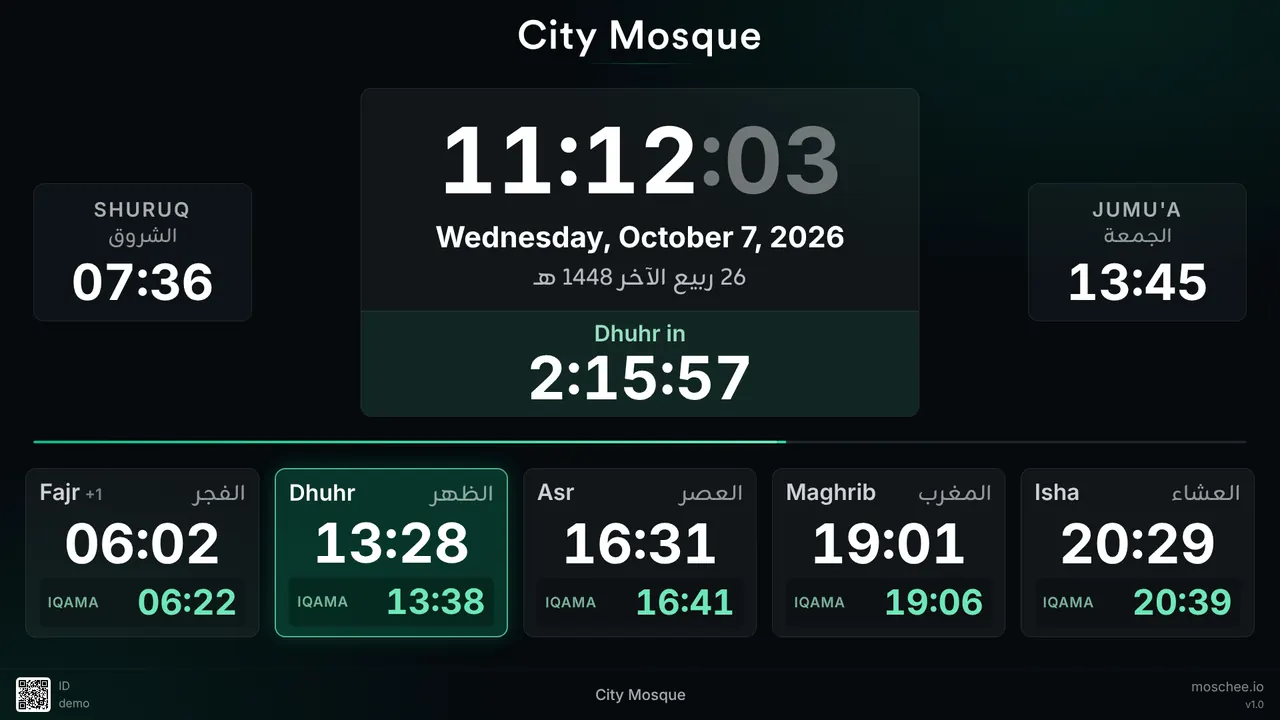
Classic
The familiar view, refreshed: a large clock with a ticking countdown, Shuruq and Jumu'a beside it, and the five prayers below with large adhan and iqama times.
Real captures of the screen app with a sample mosque. Pick a design and an orientation.
Classic is the familiar view, only larger and clearer: a countdown to the next prayer now ticks below the clock, and the adhan and iqama times have grown considerably. Split view suits mosques with a playlist, because the slides play permanently next to the prayer times. Mawaqit style is modeled on the well-known Mawaqit screen, with a giant clock and the prayers as columns. Anyone coming from there will feel at home right away. Focus puts the countdown at the center, and Board is a light timetable for bright rooms, where a dark screen looks like a black hole.
The design applies to the whole mosque, and each device can override it. The entrance can then show the Board while the prayer hall shows Focus. Every design calculates its sizes from the screen itself: a 4K TV shows the same picture as a Full HD set, only sharper, and nothing runs off the edge on unusual formats either.
A day on the screen
A good mosque screen knows where it stands in the prayer day. Play through a day, from the morning adhkar to the night:
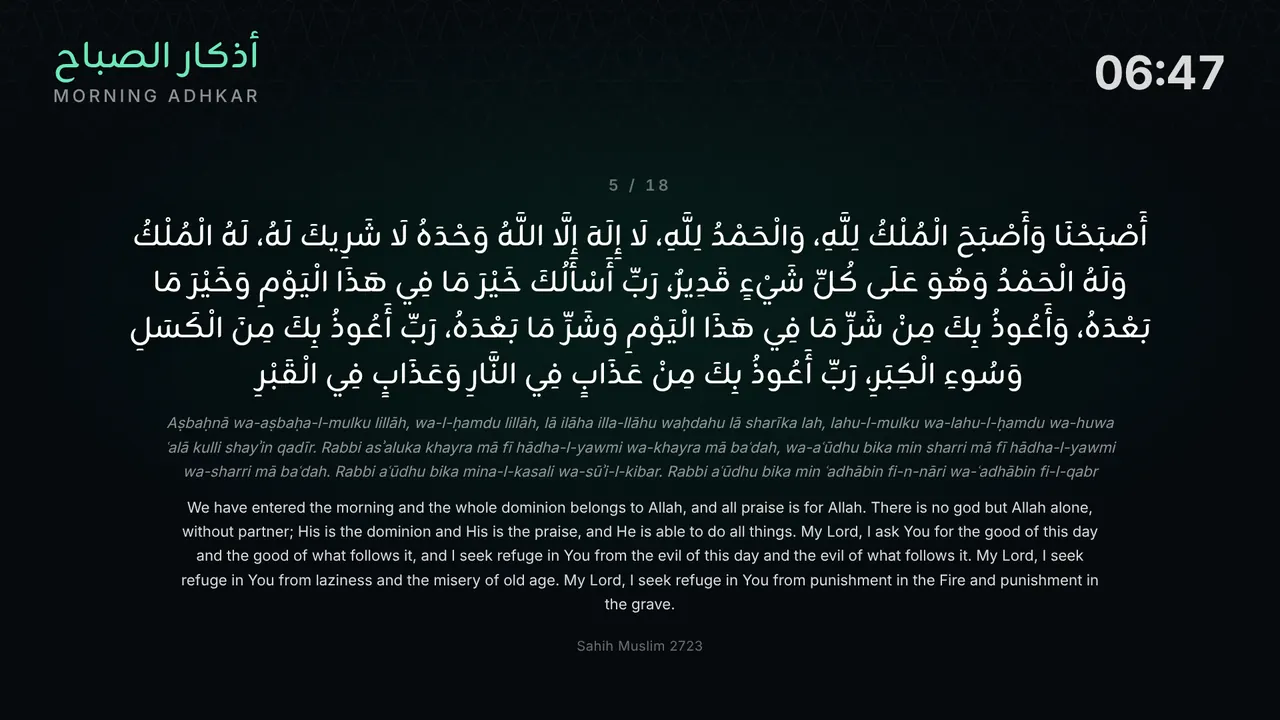
Morning adhkar
Between Fajr and Shuruq the new slide shows the morning adhkar, one after another.
A Wednesday in October with the Classic design. The day plays on its own, or jump to a moment.
Each of these views now carries the colors of the chosen design, with the same header, the same clock and a progress bar along the bottom. If you chose the Board, the adhan also gets a light page instead of a sudden black screen.
Adhan, dua and iqama
At the adhan, the name of the prayer appears large in Arabic, with "It is Dhuhr time" below it, the iqama time and the hadith on repeating the call to prayer. Then come the dua after the adhan, with transliteration and translation, and the countdown to the iqama. In the final minute it turns amber and asks everyone to silence their phones. At the iqama itself, the screen reminds worshippers to straighten the rows.
These displays used to blink every half second, so from the back you could only read them half the time. Now the text stays still, and only a soft glow moves in the background. Mosques with fixed iqama times also get the countdown and the announcement exactly at the set time, and if you like, the timetable shows the iqama as an offset from the adhan, so "+10" instead of "13:38".
Adhkar after prayer
After the prayer, the screen pages through istighfar, Ayat al-Kursi, tasbih, tahlil and dua, each with transliteration, a translation in the screen's language and its source. Longer texts such as Ayat al-Kursi stay up longer than a short dua. Every screen in the hall turns the page at the same moment, and a screen that restarts in between picks up at the right place. To show them, turn on "Show post-prayer adhkar" under Screens → Settings → General, because the screens now follow that switch. There you also set how many minutes the adhkar run after each prayer. With 0 minutes they are skipped after that prayer.
Morning and evening adhkar
New is the playlist slide Morning & Evening Adhkar. It shows the adhkar from Hisn al-Muslim one after another, but only when it is their time: between Fajr and Shuruq and between Asr and Maghrib, following your mosque's prayer times. Because these times shift every day, fixed times could hardly do this. With "Show only adhkar during the window", all other slides pause in the meantime.
Hadiths from HadeethEnc.com
The hadith overlay now shows hadiths from the HadeethEnc.com collection: the Arabic text above its translation, with source and grading. The texts appear exactly as HadeethEnc publishes them, and every screen credits the source. All screens show the same hadith at the same time, for as long as it takes to read it.
Night blackout
No screen needs to glow all night between Isha and Fajr. With the Night blackout under Screens → Settings → Alerts, it goes dark a set time after the Isha iqama and lights up again shortly before the Fajr adhan. Moschee OS and the desktop app can also switch off the TV itself. Mosques that stay open at night choose Dimmed prayer times instead: the timetable stays quietly visible, without slides, messages or ticker.
Announcements you can read
Messages from the dashboard now appear as their own page in the design's colors, instead of white text over the dimmed screen. The parking notice that almost every mosque needs on Fridays is new too: instead of a blinking red bar there is a calm banner, and the screen draws the number plate itself, in the style of 41 European countries. Up to ten vehicles fit into one announcement, and the screen shows them one after another. Try it:
Please move your car, you are blocking the driveway.
Drawn with the same component the screens use. Try your own plate and another country.
Your mosque, your settings
- Your own prayer names: under Screens → Settings → General you rename Fajr, Shuruq, Dhuhr, Asr, Maghrib, Isha and Jumu'a, for each of the five languages. An empty field keeps the standard name.
- Text size: normal, large or extra large, per screen. This helps in large halls where the last row is far away.
- Picture inset (overscan): for TVs that cut off the edge of the picture.
- Hijri correction: the correction of up to two days from your settings now applies on every screen too.
- Tomorrow's times: after each prayer, the timetable already shows its time for the next day. After Isha, it shows tomorrow's Fajr.
Presenting on the screens
A new Present section in the dashboard brings PDFs, images, a whiteboard or a shared window live onto your screens, for a talk or weekend classes, for example. You change pages with the keyboard or a presenter remote, and a laser pointer and pen are built in. If you like, the presentation joins a running livestream, so viewers see the speaker and the slides together. Presenting is included in all plans with livestreaming.
How the update reaches your screens
You don't have to do anything. Smart TV apps, the desktop app and Moschee OS fetch the new version themselves, at night and never during a prayer. Then choose a design at your own pace:
- In the dashboard, open Screens → Settings.
- Under Layout, pick one of the five designs. Each card shows a sketch of the design.
- If a single device should look different, open it under Screens → Devices and set its design, text size or picture inset there.
All settings are described in the screen settings documentation.
Frequently asked questions
Do I have to pick a new design? No. Without any change, your screen shows the Classic design, just in the new, more legible version.
Does it cost anything? No. The designs, the adhkar, the hadiths and the night blackout are part of the screens, including on the free "Prayer Times" plan. How many playlists and slides you can create depends on your plan, as before.
Do all screens in the mosque show the same thing? Yes, if you want them to. Adhkar, hadiths and the prayer announcements run in step on every screen, because they follow the clock rather than the moment a device was started.
What happens if a screen restarts in the middle of the adhkar? It picks up at the page that is currently due and keeps turning pages with the others.
Do the adhkar after prayer start by themselves? Only if the "Show post-prayer adhkar" switch in the screen settings is on. Every screen now follows it. If yours was off, turn it on. You set the minutes per prayer.
A screen that knows the day
A mosque screen is good when no one thinks about it anymore. It shows the right time, reminds people about their phones before the iqama, follows the prayer with the adhkar and goes quiet at night. With version 1.7.0 it does all of that by itself, in a design that fits your prayer hall.
moschee.io, the platform for modern mosques.