Guide
Digital Prayer Times Displays: The Setup Guide for Mosques
How to set up a prayer times screen in your mosque: hardware from a TV to a Raspberry Pi, correct calculation methods, iqama times, layout and reliability.
What you'll take away
After this guide you will know which hardware fits your mosque, how to make the display show your own prayer and iqama times without fail, and how to keep the screen running unattended for years.
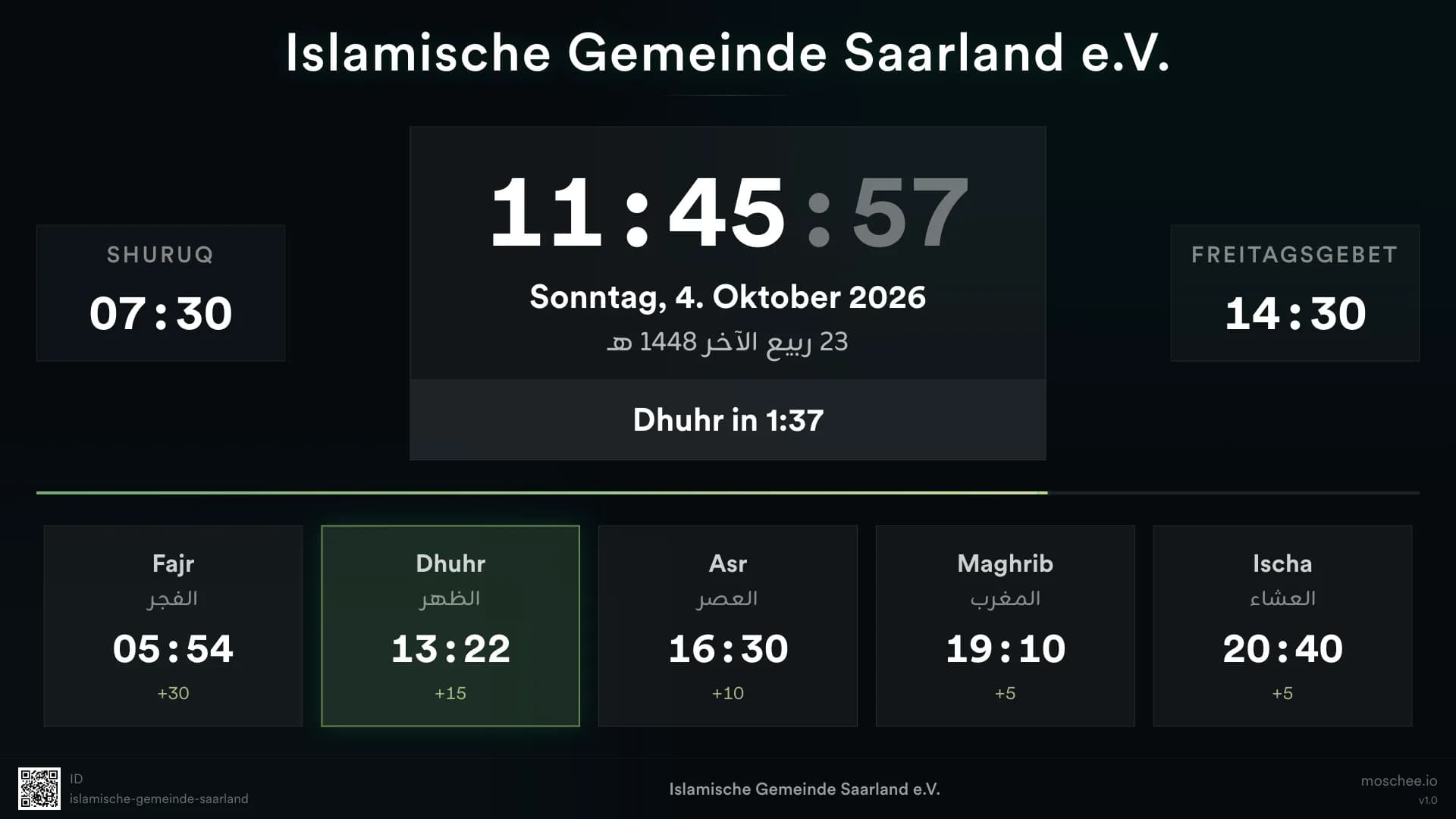
Why digital displays replaced the printed timetable
For decades, almost every mosque pinned a monthly printout of the prayer times to the notice board. The problem: paper goes stale. When the imam adjusts an iqama time, Ramadan begins, or the clocks change for daylight saving, the printout is suddenly wrong — and someone has to remember to print and hang a new one.
A digital prayer times screen solves exactly this: it is always current because it pulls its times from one centrally managed source. It also does what paper never could — show a live countdown to the next iqama, so every visitor sees at a glance how much time is left.
There is a second benefit: between prayers, the same surface works as an announcement board for classes, events, and community news. Prayer times are the first thing visitors look for when they walk in — a well-placed screen answers that question instantly and handles community communication on the side.
- Printed timetables go stale with every iqama change, clock change, and Ramadan.
- A screen always shows the current times plus a countdown to iqama.
- The same surface doubles as an announcement board for news and events.
Get the times themselves right first
The most beautiful screen is useless if the times it shows are not your mosque's times. Prayer times are not a universal truth from the internet: calculation methods differ in the sun angles used for Fajr and Isha, in the school of law for Asr (standard or Hanafi), and in the special rules for high latitudes that matter enormously in northern Europe in summer. The display must follow the method your mosque actually uses — not some default.
Then come the iqama times: almost every community sets its own offsets between adhan and iqama, often different per prayer and adjusted through the year. In moschee.io you manage the calculation method, calendars, and iqama rules centrally in the prayer times settings — and the screen picks them up automatically.
The most important principle: one authoritative source. When the screen, the website, and the community app are all fed from the same settings, they can never disagree. Nothing erodes a congregation's trust faster than an app saying 7:45 pm while the screen in the mosque says 7:50 pm.
- Check the calculation method: sun angles, Asr madhhab, high-latitude rules.
- Store iqama offsets per prayer as rules instead of typing times by hand.
- Feed the screen, website, and app from the same prayer times settings.
Never maintain prayer times in two places. The moment a second list exists — a spreadsheet, a second tool, a handwritten note — the sources will eventually drift apart, and nobody will know which one is right.
Hardware options: from a cheap TV to a ready-made appliance
You do not need special hardware. Any TV with a browser is enough to start — open your mosque's screen URL and the display is running. An HDMI stick turns even an older browserless TV into a display. Smart TVs have dedicated apps, and if you want full control, put a small mini-PC behind the set.
The most robust option is a dedicated appliance: moschee.io offers "Moschee OS", a ready-made Raspberry Pi image that boots straight into the prayer times display — no operating system to set up, no browser to configure, no remote control to hunt for. Flash the SD card, plug in the Pi, done.
Which option fits depends on budget and expectations. For a first trial, the existing TV in the community room is fine; for the screen in the prayer hall that everyone relies on daily, it pays to choose a setup that starts by itself and can be managed remotely.
- TV with a browser: free, ready immediately — but after a power cut someone must reopen the URL.
- HDMI stick: very cheap, turns any TV into a display; managed from the dashboard.
- Smart TV app: no extra device, starts with the TV.
- Mini-PC: full control and power, at a higher price and with its own maintenance.
- Raspberry Pi with Moschee OS: a low-cost appliance that boots straight into the display and is managed remotely.
For a screen that must never go stale, prefer wired Ethernet over Wi-Fi. A network cable costs a few euros and removes the most common failure source: a device that fails to rejoin the Wi-Fi after a restart.
What belongs on the screen — and how to keep it readable
The core of every prayer times display consists of a few elements: the current time, large and central; today's prayer and iqama times; a countdown to the next iqama; the Friday prayer times; and the Hijri date. Add a rotating area for announcements and events that is visible between prayers.
Two special modes make the display more valuable through the year: in Ramadan, imsak and iftar belong prominently on the screen. And during the khutbah, the same display can show the live translation as captions with moschee.io — so visitors who do not speak the imam's language follow the sermon without looking at their phones.
For the design, one simple rule applies: the screen must be readable from the back row. That means big type, high contrast, and few elements per view. Anything you cannot read from five meters away does not belong on the display — it belongs on the website or in the app.
- Essential: clock, today's prayer and iqama times, countdown, Friday times, Hijri date.
- Rotating: announcements, events, community news.
- Seasonal: Ramadan mode with imsak and iftar.
- During the khutbah: live translation captions on the same screen.
Do the readability test: stand in the farthest corner of the prayer hall. Anything you cannot read effortlessly from there should get bigger or go.
Reliability: the screen has to run unattended
A mosque screen is not a presentation someone starts in the morning — it is infrastructure. The standard is simple: after a power cut at three in the morning, the display must be running again at four, without anyone entering the building. That means starting automatically on power-on and returning to the display automatically after every restart.
Just as important is handling internet outages. A good display caches the prayer times locally and keeps showing them when the connection drops — the day's times are already known, after all. And content must be changeable remotely: with moschee.io you update announcements and settings in the dashboard, and every screen picks up the change — nobody has to carry a ladder and a USB stick to the TV.
Finally, the human factor: name one owner who deliberately looks at the screen once a week. Is it running? Are the times right? Is the oldest announcement still current? Five minutes a week prevent a frozen screen from going unnoticed for weeks.
- Does the display start by itself on power-on — no remote control, no keyboard?
- Does it survive power cuts and return to the display automatically afterwards?
- Does it keep showing cached prayer times when the internet fails?
- Can content be updated remotely from the dashboard?
- Is there a named owner who checks the screen weekly?
After setup, pull the plug once on purpose. If the display is not back by itself within a few minutes, you have found your most important problem — before it shows up on a Friday morning.
Beyond prayer times: the mosque's quiet communication channel
Once the screen runs reliably, it becomes the mosque's most effective communication channel — because it reaches exactly the people who are physically there, including those without the app or social media. Event posters, the progress of a donation campaign, classes for new Muslims, youth programs, or a janazah announcement: on the screen, all of it reaches the entire Friday congregation.
Precisely because the channel is so effective, it needs restraint. The screen hangs in a prayer hall, not in a shopping mall: calm design, no frantic animations, no cluttered layout, appropriate imagery. A few well-kept items look more dignified — and actually get read — than a dozen competing slides.
In practice, that means deciding which kinds of content are allowed on the screen and who approves them. With moschee.io you manage announcements centrally in the dashboard alongside the website and app — so the screen stays current without anyone ever having to touch it directly.
- Suitable: events, donation campaigns, classes, youth programs, janazah announcements.
- Etiquette: calm design, few slides, appropriate imagery — it is still a prayer hall.
- Clear ownership: define who approves content and when it expires.
Give every announcement an expiry date when you create it. Nothing makes a screen look more neglected than an invitation to an event that happened three weeks ago.
Common questions
What hardware do I need for a mosque prayer times screen?
Any TV with a browser is enough to start: open the screen URL and you are done. Smart TV apps or a mini-PC work as alternatives. For maximum robustness, use a ready-made appliance like moschee.io's Raspberry Pi image "Moschee OS", which boots straight into the display.
How do the screens get the correct iqama times?
From your mosque's managed prayer time settings: you define the calculation method, calendars, and iqama offsets once, and that single source feeds the screens, the website, and the app simultaneously. Change an iqama time in the dashboard and every channel picks it up automatically — they can never disagree.
Can the screen show the khutbah translation?
Yes. With moschee.io, the same screen that normally shows the prayer times displays the live translation as captions during the khutbah. Visitors who do not speak the imam's language follow the sermon right on the screen — without looking at their phones.
What does a digital prayer display cost?
Less than many expect: a used TV plus software on the free entry tier is enough to start — the display itself then costs nothing beyond the device. As your needs grow, scale up step by step: a Raspberry Pi as an appliance, a second screen in the sisters' area, or a higher plan with more features.
What happens if the internet fails?
A well-built display caches the prayer timetable locally and keeps showing the correct times even without a connection — the day's times are already known. Once the internet returns, the screen syncs automatically and catches up on changes and new announcements.
Put it into practice today
moschee.io includes prayer times, a website, an app, livestreaming, and AI translation. Prayer times are free; everything else starts with the Basis plan — try it free for 14 days.
Keep reading
Mosque Management Software: The 2026 Selection Guide
Read guide →Mosque Livestreaming Setup: The Practical Guide
Read guide →