Guide
The Right Mosque App: A Community Guide
Looking for a mosque app? Which features members actually use, directory apps vs your own branded app, how to drive installs — and what it should cost.
What you'll take away
After this guide you will know which features your community actually uses in a mosque app, whether a branded app makes sense, how to drive adoption, and what a realistic budget looks like.
Why a mosque app at all?
Your community lives on their phones. Appointments, news, family group chats — everything runs through the smartphone. A mosque that is absent there relies on word of mouth, notice boards, or the Friday announcement to spread important information. And that works less and less: whoever misses Friday misses the announcement entirely.
Push notifications close that gap. A changed iqama time, a janazah announcement, a reminder for the evening program, or Ramadan updates reach everyone with the app installed within seconds — including members who rarely make it to the mosque. No other channel gets this close to the community.
The real value of a mosque app therefore lies between Fridays: it makes the mosque present in daily life. Prayer times in the morning, a news post on Wednesday, the event on Saturday — the mosque shifts from a weekly appointment to a daily companion.
Count how many people actually heard your last important Friday announcement — then compare that with the number of phones in your community. That gap is your case for the app.
Features members actually use
Not every feature that looks good in a sales deck gets used in real life. What makes people open a mosque app daily is remarkably consistent: prayer times, news, events, donations. Everything else is garnish — nice to have, but not the reason anyone keeps the app.
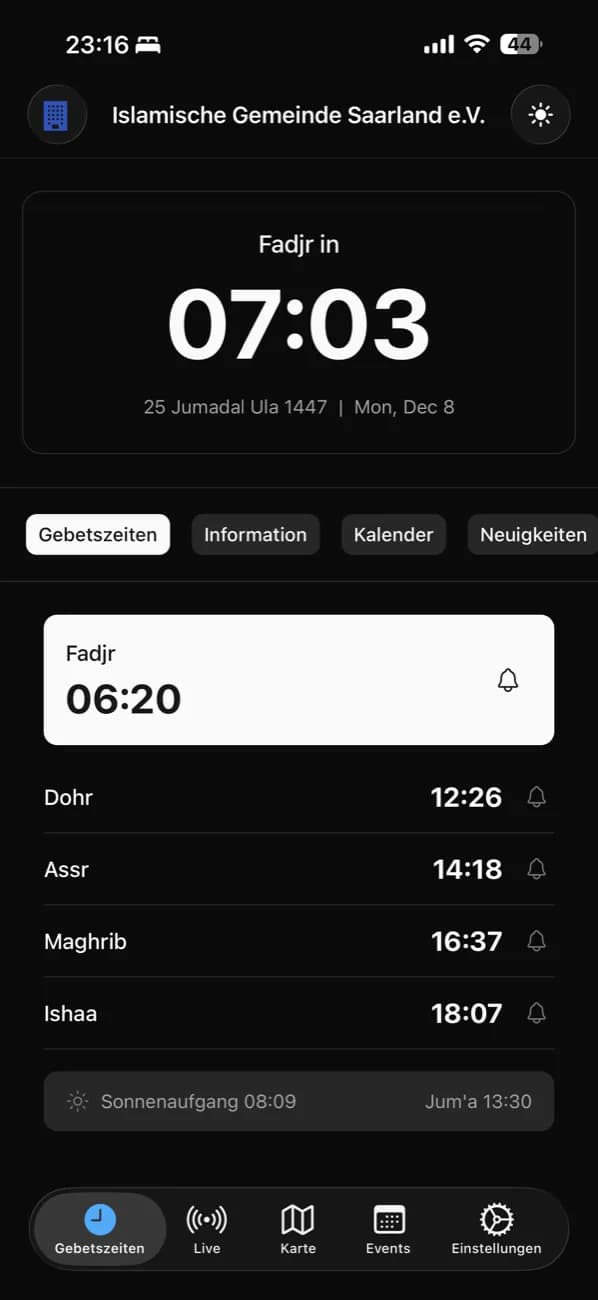
The prayer times detail that matters most: they must be your mosque's own iqama times, not generic calculations. If the app shows a different time than the screen in the prayer hall, trust evaporates instantly. Just as important: donating must never be more than two taps away, or the intention to give gets lost in a form.
Increasingly essential for many communities: access to the livestream and to the live khutbah translation directly from the app. Members who do not follow the sermon in Arabic or the local language listen along on their own phone — no extra app, no detours.
- Prayer times with the mosque's own iqama times — not just calculated values
- Push notifications for short-notice changes and announcements
- Community news and announcements
- Events with sign-up (RSVP)
- Donations in two taps at most
- Access to the livestream and live khutbah translation
Fewer features done well beat a bloated menu every time. An app with five well-maintained sections feels more professional than one with fifteen empty ones.
Shared directory app or your own mosque app?
There are two fundamentally different app models. Directory apps bundle many mosques into a single app: users find prayer times and basic information for many communities in one place. Volunteer projects like MyMosq are a good example — valuable for travellers and for anyone keeping an eye on several mosques.
A branded app of your own does a different job: it carries your mosque's name, shows your content, and sends your push notifications. The home screen belongs to your community, not to a directory of hundreds of entries. Only then does the app become a real communication channel rather than a reference tool.
The two models are not mutually exclusive. Your mosque can stay listed in directory apps and run its own app at the same time.
Ask yourselves: do we want to be found, or do we want to communicate? A directory covers the first; the second needs your own app.
Getting the community to install it
The best app is useless if nobody installs it. The launch is decisive: announce the app right after Friday prayer — the moment when most of the community is in the building at once. A single sentence from the imam does more than any poster, because it lends the app the mosque's authority.
Make installing trivial: QR codes on posters at the entrance, on the screens in the prayer hall, in the community newsletter. Nobody should have to type an app name into a store. And win over the youth first — they install the app in seconds and then set it up on their parents' and grandparents' phones.
The most common mistake: launching an empty app. Prepare content for the first month — news posts, upcoming events, accurate prayer times. Whoever opens the app and finds nothing will not open it a second time.
- Announce right after Friday prayer, with one sentence from the imam
- QR posters at the entrance and on the mosque's screens
- Win the youth first — they install the app for their parents
- Prepare a month of content before the app goes live
- In the first weeks, push every announcement through the app as well
Keeping the app up to date
A mosque app needs regular maintenance in the months after launch. A simple weekly rhythm is enough: check the prayer times for accuracy, publish one news post, update the upcoming events.
For that rhythm to survive, the app needs an owner. Not "the board takes care of it", but a name with a fixed half hour per week. Where responsibility stays vague, maintenance tends to end after the first Ramadan.
The biggest lever against the workload is single-source publishing: maintain content once and have it flow automatically to the website, the app, and the screens. With moschee.io this is the default — a news post in the dashboard appears on the website, in the community app, and on the mosque's screens, without anyone typing anything three times.
- Weekly: check prayer times, one news post, refresh the events
- One named owner with a fixed weekly time slot
- Maintain content once — one dashboard feeding website, app, and screens
Schedule the fixed maintenance slot on Thursday: prayer times, news, and events are then fresh for Friday — the day the app gets opened most.
Cost and effort, realistically
A custom-developed mosque app costs a community tens of thousands of euros — and that is only the beginning. Ongoing duties follow: operating system updates, app-store policies, server operations, bug fixing. An agency-built app without a maintenance contract ages faster than most boards expect.
Platform apps flip that equation: the community app is part of a subscription, the vendor handles updates and store maintenance, and the content comes from the same dashboard as the website and screens. With moschee.io the community app with news, events, and donations is included from the Basis plan, which you can try free for 14 days — with GDPR-compliant hosting in Europe.
What to check when comparing: is the app genuinely present in the app stores? Do push notifications arrive reliably and quickly? And does the interface speak your community's languages — with moschee.io that means German, English, French, Turkish, and Arabic.
- App-store presence: is the app truly findable on the Apple App Store and Google Play?
- Push notification reliability — your most important channel must not wobble
- A multilingual interface covering your community's languages
- Updates and store maintenance included in the price, no extras
- Privacy: GDPR compliance and hosting in Europe
Always compare total cost over time: what does the app cost in year three — including updates, store fees, and maintenance? Only then are custom builds and platforms truly comparable.
Common questions
How much does a mosque app cost?
A custom-built app quickly runs into tens of thousands of euros plus ongoing maintenance. With platform vendors the app is part of the subscription — with moschee.io the community app is included from the Basis plan, which you can try free for 14 days.
Do we need our own app if we're already on MyMosq?
They do different jobs: a directory app makes your mosque findable, while a branded app gives you your own channel with your content and push notifications. The two can happily coexist.
What should we post in a mosque app?
Everything the community needs to know promptly: prayer and iqama time changes, events, khutbah recordings and live translation links, and current donation campaigns. Short and regular beats long and rare.
Does the app work in multiple languages?
With moschee.io, yes: the interface is available in German, English, French, Turkish, and Arabic — every member uses the app in their own language. On top of that comes access to the live AI khutbah translation into many languages.
How do older community members cope with an app?
With simple navigation and no pressure: the key is that the website, the app, and the mosque's screens show the same content — so nobody who skips the app is excluded. In practice, the younger generation also sets the app up on their parents' and grandparents' phones.
Put it into practice today
moschee.io includes prayer times, a website, an app, livestreaming, and AI translation. Prayer times are free; everything else starts with the Basis plan — try it free for 14 days.
Keep reading
Mosque Management Software: The 2026 Selection Guide
Read guide →AI Khutbah Translation: The Complete Guide for Mosques
Read guide →