Guide
How to Live-Translate the Khutbah (Friday Sermon): Step-by-Step Guide
Live-translate the Friday khutbah in six steps: choose a translation mode, feed clean audio, set up the session, connect listeners via QR code, and rehearse.
What you'll take away
After this guide, your community can reliably live-translate the Friday sermon week after week — with clean audio, easy access for every listener, and a fixed routine one person can start in minutes.
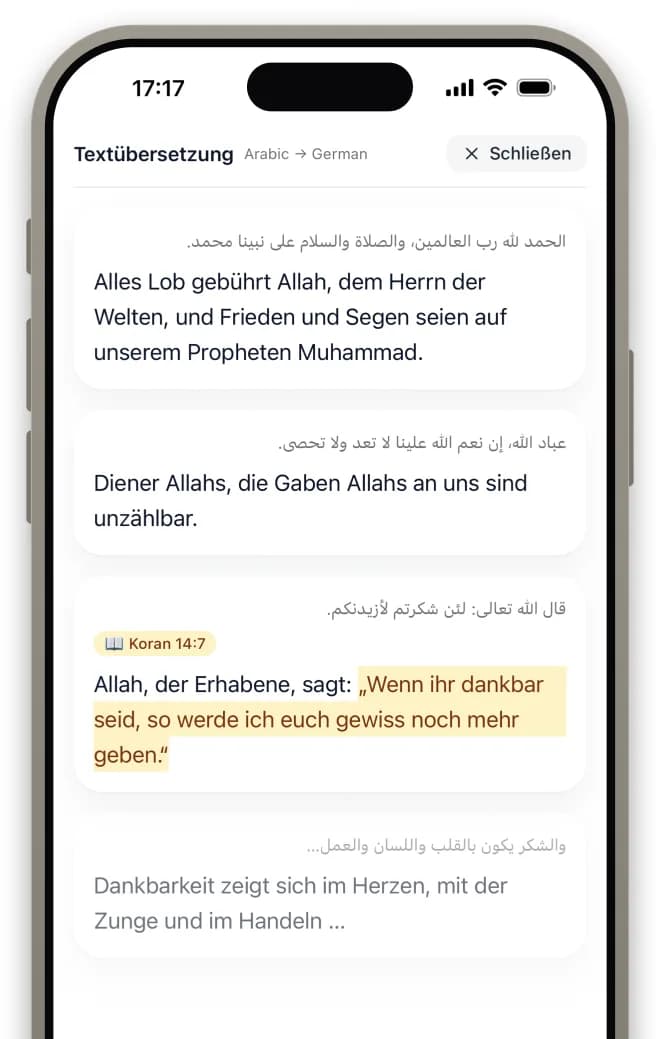
Step 1: Choose your translation mode
Before buying any equipment, decide how the translation should happen. There are three proven models: AI translation, a human interpreter, or a hybrid of both. AI translation runs automatically, covers many target languages at the same time, and needs no extra volunteers — ideal when your community speaks several languages or nobody can interpret every single week.
With human interpretation, a bilingual community member renders the sermon live into a second audio channel. This often produces the most natural language and handles religious terminology with great sensitivity — but it requires a suitable person to be available every week and usually covers only one target language.
Many mosques run a hybrid: a human interpreter for the most important second language, AI for everything else. Platforms such as moschee.io support both modes in the same session, so you can start small and later switch or combine without rebuilding your setup.
Survey your congregation first to learn which languages are actually needed — the real demand is often distributed differently than the board expects.
Step 2: Get the audio right
Audio quality determines translation quality — for AI and human interpreters alike. The golden rule: feed the minbar microphone signal directly from the mosque's mixer or amplifier into the streaming device (phone, laptop, or audio interface). Never rely on a device's built-in room microphone: reverb, chatter, and air conditioning make any recognition unreliable.
Watch your levels. A clipped, overdriven signal distorts and is harder for speech recognition to process than a quiet one. Test the volume in advance and set the gain so that even the khatib's loudest passages stay out of the red. A clean mono voice signal beats any elaborate stereo or effects chain.
Most mosques already own everything they need: a spare line output on the mixer plus a matching cable or an inexpensive USB audio interface is enough. No studio gear required.
- Mixer line-out: take the translation feed directly from the desk, never via a microphone in the room.
- USB audio interface: connects the mixer output reliably to a laptop or phone.
- Gain staging: set levels so loud passages never clip.
- Backup cable: keep a second, tested cable within reach — cables are the most common point of failure.
Do the soundcheck at the khatib's real sermon volume — not at normal speaking level. Many khatibs get considerably louder on the minbar, and that is exactly when the signal clips.
Step 3: Set up the translation session
In your platform's dashboard, create the room or stream for the Friday sermon. Pick the source language(s) of the khutbah — realistically: in many mosques the khatib switches between Arabic and German or English mid-sermon. This code-switching is normal, so select every language that is actually spoken so recognition doesn't drop out at each switch.
Next, enable the target languages your community speaks and decide whether listeners get captions, translated audio, or both. Captions work well in the prayer hall and on mosque screens; audio suits listeners with earphones.
Finally, set the privacy: a public link is easy to share, while an unlisted link keeps the session restricted to your congregation. Check this setting deliberately before distributing the link.
Start with two or three target languages and expand only once the routine is solid. Fewer languages mean less to verify — and quality stays easier to monitor.
Step 4: Give listeners easy access
The best translation is useless if the congregation cannot find it. The easiest route is QR codes: on the mosque screens, on posters, and at the entrance. Scanning the code takes listeners straight into the translation — in the browser, with no app install. That dramatically lowers the barrier, especially for guests and older community members.
Add a short, memorable link on the mosque website and in the community app so people at home can join too. In your announcement, remind everyone to bring earphones — without them, translated audio disturbs neighbours in the prayer hall.
Also show the captions on the mosque screen: everyone can read along, even without a smartphone — and deaf and hard-of-hearing community members are fully included, often for the first time.
Laminate the QR posters and hang one right by the shoe racks — that is where everyone still has their phone in hand.
Step 5: Run a full rehearsal before Friday
Test the complete flow mid-week — not on Friday minutes before the khutbah. Invite two or three volunteers with different target languages: one person speaks into the minbar microphone (ideally switching between the source languages), while the others listen on their phones and report whether audio, captions, and delay hold up.
During the test, walk the prayer hall, the women's area, and the side rooms, checking Wi-Fi and mobile coverage in the spots where people actually sit. Also verify that the captions on the screens are easy to read.
Finally, settle responsibility: who presses start on Friday, and what is plan B? A proven fallback: if the translated audio fails, the captions keep running on the screen — the translation survives even when part of the chain breaks.
- Rehearsal checklist: cable and interface connected, levels checked, session started.
- 2–3 volunteers listen in different target languages and give feedback.
- Walk the prayer hall, women's area, and entrance: check Wi-Fi/mobile coverage and QR codes.
- Check the screens: captions visible and readable from the back row.
- Name the owners: who starts, who covers, what is the fallback?
Write the final settings (levels, languages, link) on a laminated card next to the mixer — that way anyone can take over the duty in an emergency.
Step 6: Run it live and keep improving
On Friday itself: start the session before the khutbah begins — ideally during the adhan, so listeners can connect calmly. The person in charge monitors the translation on a second phone: is the audio running, are captions appearing, is the delay acceptable? Problems surface immediately instead of after the prayer.
After the prayer, do a short round: ask a few listeners from different language groups how clear the translation was. Then review the recording in the archive to revisit difficult passages — and adjust languages, levels, or settings accordingly.
The biggest success factor is not technology but a routine with clear ownership: name a volunteer or a small team that owns the translation service. After three or four Fridays the flow is so well-rehearsed that it takes only a few minutes of attention per week.
Set up a fixed feedback channel — for example a short question in the community group after Friday prayer. Regular small feedback beats one big annual survey.
Common questions
How long does the setup take each Friday?
With a fixed setup, only minutes: the cable or interface stays connected, the session template is ready — one person starts the translation, glances at the levels, done. The real effort sits in the initial setup and the rehearsal, not in the weekly routine.
What equipment does a mosque need?
Usually nothing new: the existing PA system provides the signal, plus a cable or an inexpensive USB audio interface and a phone or laptop as the streaming device. No special hardware, radio receivers, or booths like classic simultaneous interpreting — listeners use their own smartphones.
What if the imam switches between Arabic and German or English?
This code-switching is the norm in European mosques, not the exception. Choose a solution that handles several source languages within the same sermon and register every language actually spoken in the session. Make the switch part of your rehearsal — this is exactly where simple single-language tools fail.
Can we translate other lectures and classes too?
Yes — the workflow is identical. Whether Friday sermon, dars, halaqa, seminar, or community meeting: create the session, pick the languages, share the link. Many mosques start with the khutbah and then extend the service to weekly classes and events, since the equipment and routine are already in place.
Do we need the congregation's consent?
Always inform the congregation transparently that the sermon is being live-translated — for example via notice board and announcement. Once recordings are made, define a clear policy: what is stored, for how long, and who has access. Mosques in the EU should additionally prefer a GDPR-compliant solution with hosting and processing in Europe — it simplifies the data protection questions considerably.
Put it into practice today
moschee.io includes prayer times, a website, an app, livestreaming, and AI translation. Prayer times are free; everything else starts with the Basis plan — try it free for 14 days.
Keep reading
AI Khutbah Translation: The Complete Guide for Mosques
Read guide →Mosque Livestreaming Setup: The Practical Guide
Read guide →