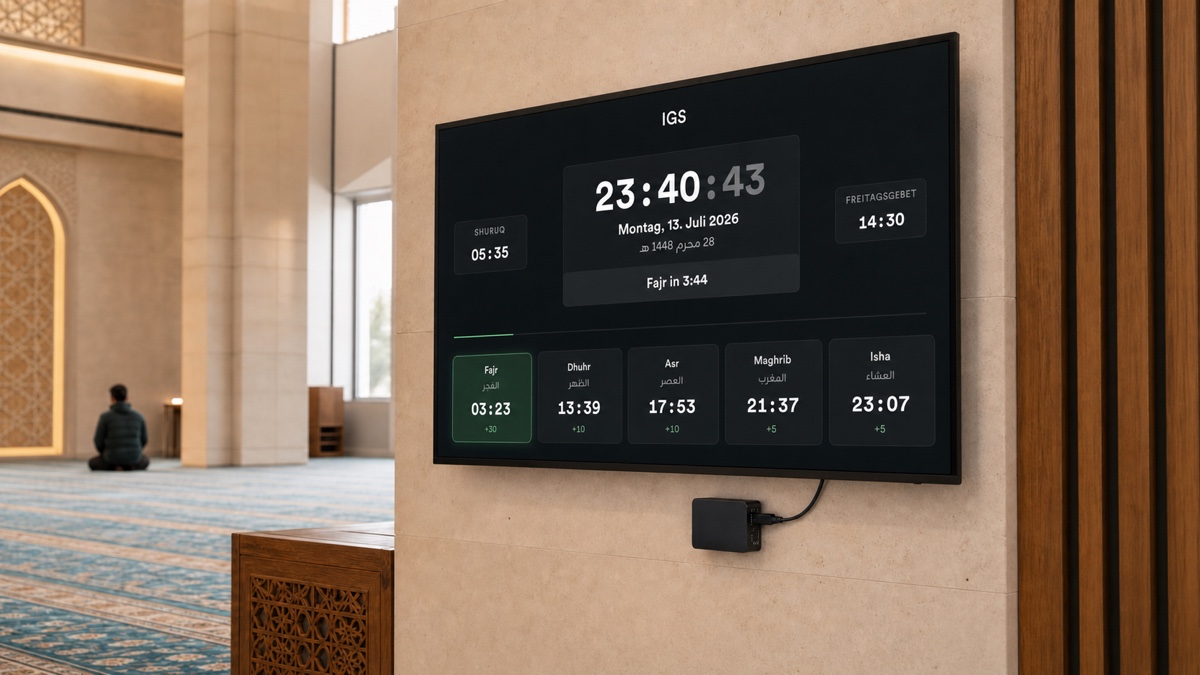
There is a TV in almost every mosque entrance hall, and behind it, almost always, a story. A laptop taped to the wall running a PowerPoint. A USB stick that someone updates "when there is time". Prayer times that were right until the clocks changed and then quietly weren't. The brother who set it all up moved cities two years ago, and now nobody dares touch it.
A mosque screen has one job: show the correct prayer times, all day, every day, without anyone thinking about it.
Mosque screens from moschee.io now run on practically anything with a display. Smart TVs through the hosted TV app, any computer through the desktop app, and the one we are most excited about, Moschee OS: a ready-made operating system image that turns a ~€60 Raspberry Pi into a dedicated screen that boots straight into your display and keeps itself up to date.
What the screen actually shows
This is a living miniature of the real thing. It cycles through the same slides your visitors would see: prayer times, a hadith of the day, upcoming events, a live donation campaign.
Prayer times today
Fajr
04:12
Shuruq
05:58
Dhuhr
13:24
Asr
17:31
Maghrib
21:38
Isha
23:07
A living miniature of the real screen. It rotates on its own — tap a tab to jump.
Behind it sits a full playlist system in your dashboard: prayer timetables for today, tomorrow or the week, Jumu'ah sessions with the khatib's name, Ramadan timings with imsak and iftar, event posters, donation campaigns with live progress, a "please silence your phone" slide for prayer times, and more. When the adhan comes, the screen takes over with the prayer announcement on its own, so no slide ever plays over the khutbah.
And because the screen is connected to your dashboard, a change you make on your phone, a new event or a shifted iqama, appears on the wall within seconds.
Which path fits your mosque?
Different mosques stand in front of different hardware. Pick what you have, and see the fastest way to a running screen:
What is already at your mosque?
Open the hosted screen
Samsung Tizen, LG webOS and Hisense Vidaa can simply open your screen URL in the TV browser. No install, running in two minutes.
The Smart TV path
If your TV runs Samsung Tizen, LG webOS, or Hisense Vidaa, the quickest start needs no installation at all. Open your mosque's screen URL in the TV browser and you are live. For a permanent setup, you will find the moschee.io app in your Smart TV's app store.
One honest caveat from our own testing: consumer TVs vary in whether a browser or store app can launch itself after a power cut. For a screen that must always come back on its own, the two paths below are the more reliable choice.
The desktop app
Any Windows, macOS, or Linux machine, including that mini-PC already lurking behind your TV, can run the moschee.io desktop app. It pairs with a QR code once, then runs fullscreen and looks after itself. This is also the right path if your screen should keep working when the internet doesn't. The app keeps showing prayer times offline and re-syncs when the connection returns.
Moschee OS: the €60 screen appliance
Moschee OS is a complete, ready-made operating system image for the Raspberry Pi with the screen app already inside. No Linux knowledge, no keyboard, no desktop to configure. It boots directly into your mosque's display, works offline, and updates itself.
Flash the card
Write the image to a microSD card with Raspberry Pi Imager, insert it, power on.
Connect to Wi-Fi
Join the Moschee-Setup hotspot from your phone and pick your network — or plug in a cable.
Scan to pair
The TV shows a QR code. Scan it as a mosque admin and the screen belongs to your mosque.
From an empty SD card to a running mosque screen in about fifteen minutes.
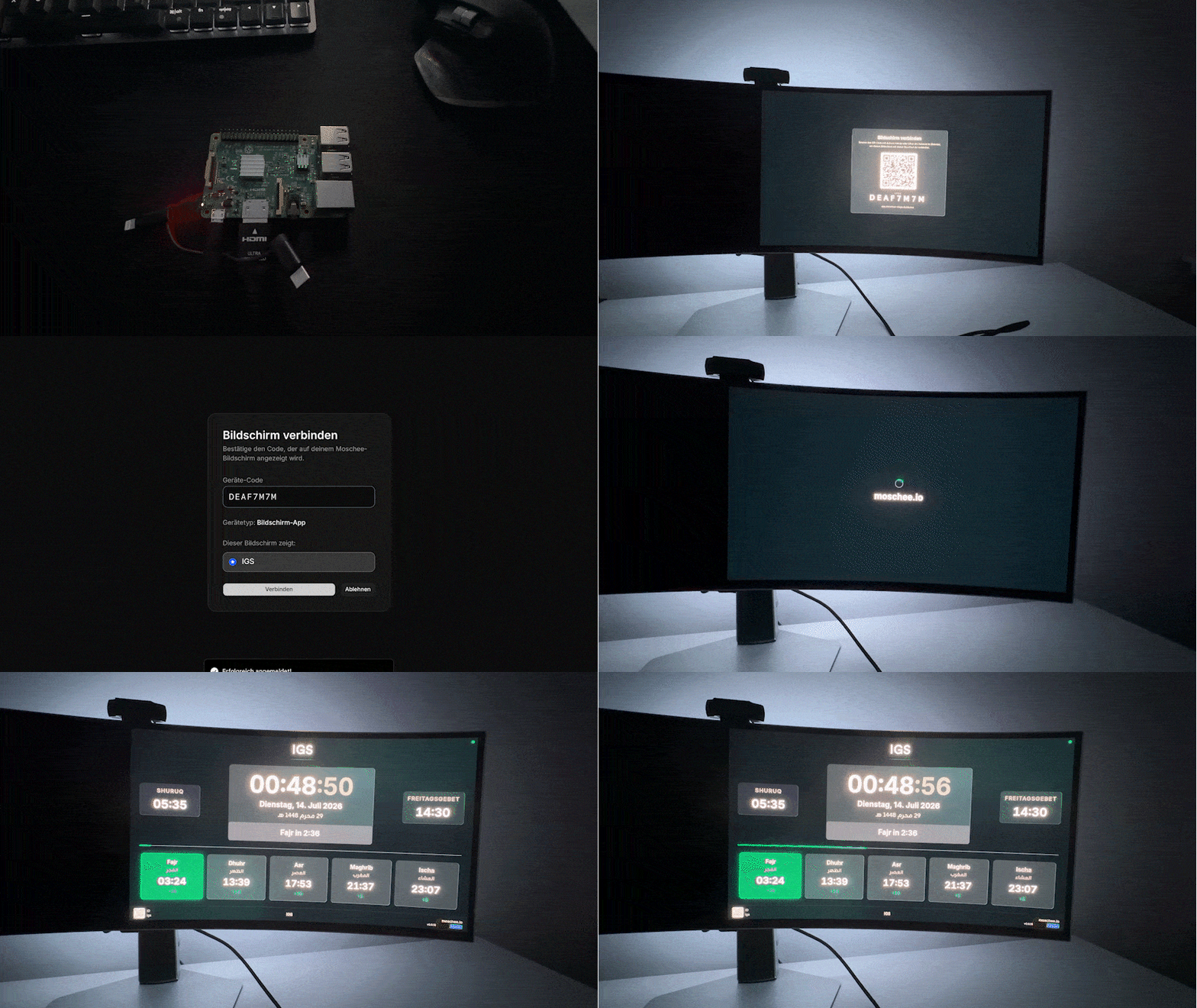
It is display-only, exposes no desktop, and never stores your admin access. If someone walks off with the Pi, they have a €60 computer, not a key to your mosque's data.
Automatic updates
The real cost of a mosque screen is not the hardware. It is every future evening someone spends on a ladder with a USB stick. So every path, the desktop app and Moschee OS alike, keeps itself current:
Checks
Shortly after launch, every 6 hours, and whenever it comes back online.
Downloads
The new version arrives quietly in the background.
Installs at night
In a quiet window between 03:00 and 04:00, never during prayer.
Up to date
The screen is on the latest version before Fajr.
Nobody climbs a ladder with a USB stick. Every screen keeps itself fresh.
Every improvement we ship simply arrives, in the same quiet night window, on every screen. The mosque that paired a Raspberry Pi in July is running the newest version in December without anyone having touched it.
What the whole thing costs
A commercial digital-signage setup easily runs to a dedicated player plus a monthly per-screen licence. The moschee.io way is simpler: use the TV you already own, and if it isn't smart, add a Raspberry Pi for around €60, once. The screen software itself is part of your moschee.io plan, and one dashboard drives as many screens as your mosque has walls. The timetable at the entrance, the announcements in the prayer hall, the events board in the youth room, each with its own playlist.
A pre-configured plug-and-play box, the Moschee Player, is in the works for mosques that want zero setup. Until it ships, the Pi image is the closest thing to it.
Hardware choices, mounting and content are covered in detail in our guide to the digital prayer times display for mosques.
Frequently asked questions
Does it work without internet? Yes. The desktop app and Moschee OS keep showing prayer times through an outage and re-sync when the connection returns. Only live content, like campaign progress, waits for the network.
Can we run more than one screen? Yes. Pair as many devices as you like and give each its own playlist: entrance, prayer hall, women's section, youth room.
Our TV is old and not smart at all. Are we out? Not at all. That is exactly what Moschee OS is for. Any TV with an HDMI port plus a Raspberry Pi becomes a smart mosque screen.
Do I need to know Linux for Moschee OS? No. Flash the image with the Raspberry Pi Imager, connect it to Wi-Fi from your phone, scan the QR code on the TV. That is the entire setup.
How do updates work? Automatically. Screens check for new versions regularly and install them in a quiet window between 03:00 and 04:00, never during prayer and never with a USB stick.
What happens if the power goes out? The screen boots straight back into the display when power returns. That is the point of the appliance paths: no login screen, no "restore session?" dialog waiting for a mouse that isn't there.
One less thing to think about
The best mosque screen is the one nobody talks about. It just shows the right times, welcomes the right guests, and announces the right events, for years. That is the standard we are holding ourselves to, whether your screen is a brand-new Samsung, a ten-year-old TV with a €60 computer behind it, or the mini-PC that has been in the cupboard since 2019.
Screens are live today in your dashboard, including the Moschee OS image downloads.
moschee.io, the platform for modern mosques.